When learning professionals need a platform for corporate training development, Articulate is a common choice. With 125,000 organizations served and 133 million learners (according to the Articulate (Articulate 360 Trial | Articulate. Articulate. 2026) official website), it offers a rich selection of tools for any need. When it comes to Articulate Rise vs. Storyline, you really can’t go wrong — both are top picks.
Both solutions allow learning & development teams to create highly interactive custom training, but they serve different purposes. Choose the wrong one, and you will waste time and budget redoing everything afterward.
This article compares the subtleties of e-learning development in Articulate Storyline vs. Rise. As a team that builds e-learning solutions in both tools, we share real project insights and a practical framework for picking the right technology. 🤩
Summary
- What is Articulate Rise 360
- What is Articulate Storyline 360
- Articulate Rise vs. Storyline: side-by-side comparison
- When to choose Articulate Rise
- When to choose Articulate Storyline
- How to decide: a quick and practical framework
- Examples of projects created with Articulate
- Final words
What is Articulate Rise 360
Articulate Rise 360 is a browser-based e-learning development tool that allows users to create interactive online courses and microlearning experiences. It’s part of the broader Articulate 360 suite, with convenient drag-and-drop functionality and built-in responsive design. Using Articulate Rise 360 requires no programming skills, and the learning curve is really shallow.
For students, using Rise-based products feels like scrolling a web page. It’s similar to a modern website, where you move between content sections, interacting with embedded activities along the way. Content comes in responsive sections that include flashcards, timelines, and knowledge checks. The experience is mobile friendly and universal across devices.
📌 Articulate Rise pros
- Ease of use. This tool supports a simple drag-and-drop interface, which allows authors to see how learning activities will look right away. No coding skills or substantial e-learning development experience required.
- AI-powered block generation and editing. It can generate blocks using AI, extracting information from source documents or researching new topics.
- Built-in interactive elements. The software enables authors to add flashcards, tabs, timelines, labeled graphics, scenario blocks, and knowledge checks.
- Ready-made templates. Articulate Rise offers over 1,000 course templates for rapid e-learning development.
- Collaboration opportunities. Rise allows authors to invite team members and contribute simultaneously.
- Responsiveness. It has built-in responsiveness and automatically adapts content to learners’ devices without extra configurations.
“Rise is an excellent, basic tool for development of eLearning. It’s reliable and has arguably the softest learning curve of any other tool on the market right now.
But it is basic. It comes with a core set of interactions (which you can enhance with Storyline blocks), and the design forces a pretty linear approach. With well-considered design, you can turn out engaging content in Rise, but it is easy to abuse and create boring, one-dimensional, page-turners.” (Reddit)
📌 Articulate Rise cons
- Basic functionality. Rise focuses on core functionality without complex game mechanics or advanced simulations.
- Limited customization and branding options. The tool restricts layout and interface changes to minor modifications and doesn’t allow users to fully adjust learning experiences.
- Weak software simulation. It lacks step-by-step interactive simulations and has poor screen recording functionality.
- Basic branching scenarios. The tool supports relatively simple branching scenarios with few decision paths and limited dynamic learner feedback.
- Available only online. Rise requires internet access for creating courses due to its cloud-based nature.
- Plain designs. It prioritizes similar-looking courses that rely on ready-made templates rather than unique designs.
What is Articulate Storyline 360
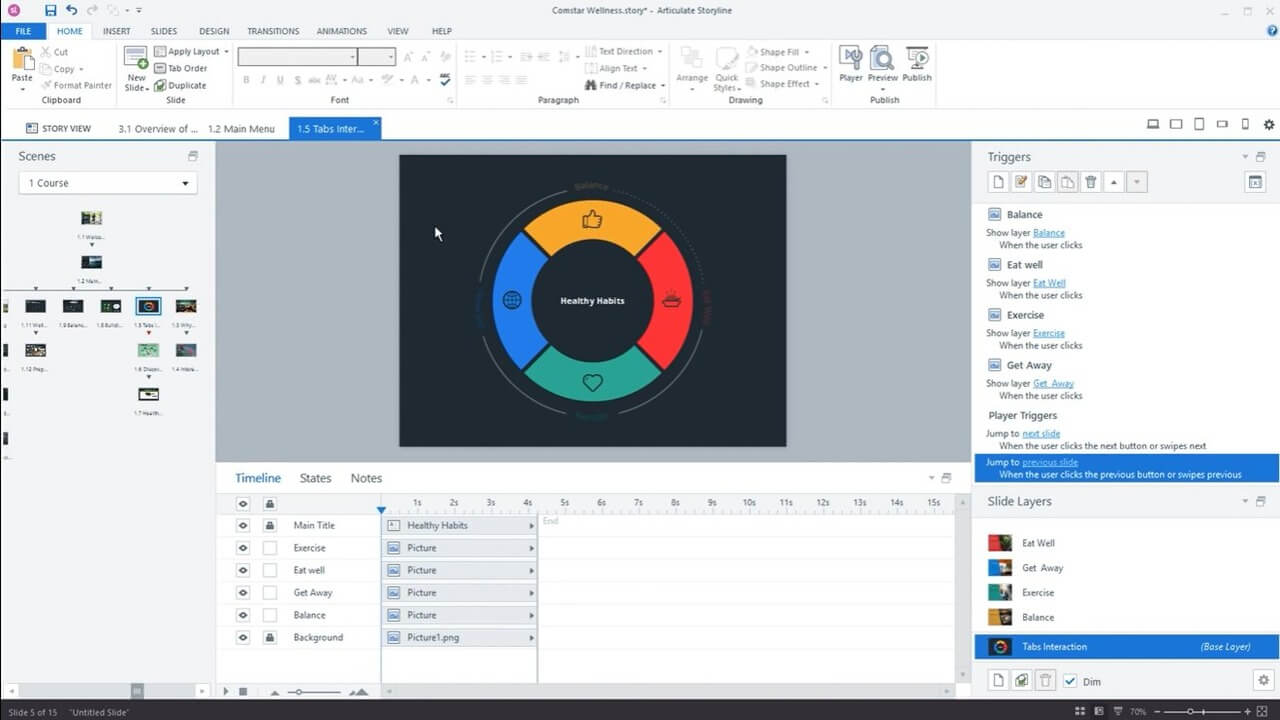
Articulate Storyline is a slide-based authoring tool with an interface similar to PowerPoint. It helps create highly interactive, custom e-learning courses with simulations and scenario-based experiences. Storyline has a steeper learning curve than Rise and requires professional expertise to design truly interactive courses.
For learners, a Storyline-based course feels like a sequence of slides or screens with gaming elements, simulations, drag-and-drop activities, and decision-making tasks.

📌 Articulate Storyline pros
- Customizability and programming-like functionality. Storyline allows you to create personalized learning paths with triggers and variables, add different effects, and modify objects.
- Advanced e-learning capabilities. It supports screen recording, quizzes, software simulations, and pre-built slide templates.
- Flexible design. Storyline gives full control over course appearance with custom layouts, branding, navigation, and visual effects.
- Rich branching scenarios. It enables decision-based learning, allowing students to face different outcomes depending on their choices.
- Multiple assessment options. The platform provides significant assessment flexibility, including multiple-choice, matching, drag-and-drop, sequencing, and free text tasks.
- Offline content creation. Storyline runs on desktop devices for local storage and content development without internet access.
“SL is a blank canvas and its limitations are more to do with the designer than the tool. I appreciate that it can be intimidating if all you have done previously is select an interaction and configure it.” (Reddit)
📌 Articulate Storyline cons
- Steep learning curve. Storyline is more difficult to master than Rise due to triggers, variables, layers, conditional logic, and other customization options.
- Slower development. It takes more time to launch and has longer production cycles since Storyline-based courses are usually more sophisticated.
- Limited mobile support. Storyline is not automatically responsive across different screen sizes, and smooth mobile experiences may require additional design tweaks.
- Windows based. The tool creates additional complexities for Mac users, forcing them to use virtualization software or a Windows environment.
- Complex maintenance. Storyline-based courses with unique navigation logic and branching scenarios increase maintenance effort.
Articulate Rise vs. Storyline: side-by-side comparison
Looking at Rise 360 vs. Storyline 360, both platforms are suitable for online course development, but they cover different learning needs. Below, we share a concise comparison table to help you better understand what each of them does.
|
Articulate Rise |
Articulate Storyline |
|
|
Authoring environment |
Web based |
Desktop based (Windows) |
|
Course creation process |
Block-based course building |
PowerPoint-like slides |
|
Design customization |
Themes, fonts, colors, and branding elements |
Advanced customization of every slide, object, animation, and interactions |
|
Interactivity |
Ready-made interactions (e.g., flashcards, timelines, accordions, knowledge checks) |
Advanced interactions (e.g., drag-and-drop activities, simulations, games, interactive videos, adaptive learning paths) |
|
Collaboration options |
Easy cloud-based collaboration with shared access |
Possible, but requires file sharing |
|
Development speed |
Fast course creation |
More time required |
|
Mobile responsiveness |
Fully responsive across smartphones, tablets, and desktops |
Requires specific design adjustments |
|
LMS compatibility |
AICC, SCORM, xAPI, and cmi5 |
AICC, SCORM, xAPI, and cmi5 |
|
Maintenance |
Minimal technical effort |
More time consuming with careful testing |
|
Use cases |
|
|
|
Price |
Offered within the Articulate individual package ($1,449 USD / user annually) |
Offered within the Articulate individual package ($1,449 USD / user annually) |
Comparing Rise vs. Storyline, Rise provides instructional designers with fewer customization options and interactive elements. Its block-based authoring nature makes it highly intuitive and suitable for users who don’t have much experience in educational content creation. However, this may be an advantage if you are looking for something simpler and want a tried-and-true layout in a convenient e-learning authoring tool.
Articulate Storyline, on the other hand, may be more demanding, but it allows learning professionals to create highly customized content. They can personalize every element, add multiple types of assessments, and create complex branding scenarios. It makes Storyline-based courses more effective for training skills and decision-making, while Rise is more convenient for knowledge sharing.
When to choose Articulate Rise
When choosing between Articulate Rise 360 or Storyline, Rise is typically a better option for sharing knowledge, like policies, procedures, or product information. It may be a more justified solution if you:
- Need to build and launch a course as quickly as possible;
- Share informational content (e.g., employee handbooks, company policies, benefits training, or product insights);
- Prioritize mobile learning;
- Have limited resources to develop and maintain the course;
- Expect collaboration between multiple teams.
When to choose Articulate Storyline
Articulate Storyline is typically a better option to practice skills, make decisions, and explore consequences. Our team recommends choosing Storyline if you:
- Need to train practical skills (e.g., customer service, leadership development, sales);
- Want advanced branching scenarios or software simulations;
- Create custom interactions that standard templates cannot cover;
- Prefer full control over branding and design;
- Need advanced assessment logic with versatile types of tasks;
- Prefer desktop-based course development and offline access.
How to decide: a quick and practical framework
A comparison of Rise vs. Storyline features and differences may be overwhelming. For simple guidance on which tool to use, follow the table below. Think about the goals of the course you develop and the available resources to make the right choice.
|
Project characteristic |
Rise |
Storyline |
|
Transferring knowledge |
Yes |
No |
|
Limited budget and time |
Yes |
No |
|
Mobile responsiveness |
Yes |
No |
|
Browser-based development |
Yes |
No |
|
Low authoring experience level |
Yes |
No |
|
Training practical skills |
No |
Yes |
|
Advanced customization and branding |
No |
Yes |
|
Established L&D team |
No |
Yes |
In many cases, you can combine Rise and Storyline to get the best of both. A common approach is using Rise for course structure and Storyline for advanced capabilities and hands-on practice. Since both Articulate Rise and Storyline come within the single Articulate package, you don’t even need to purchase them separately. Get one subscription, and use the most suitable features based on your instructional design and learning objectives.
Examples of projects created with Articulate
Articulate is one of the leading e-learning development platforms, and courses created with it look professional. You can make them highly interactive to keep learners engaged and combine multiple types of content. Here are a few examples to visualize what Rise and Storyline can do.
👉 Rise: course on how to conduct an effective job interview
This is a sample web page (Rise 360. 2026) shared by Articulate to demonstrate the functionality of Rise. The course has a clear structure and intuitive navigation, allowing users to jump between sections. It has embedded videos, notes, and multiple clickable elements to interact with. The learning experience looks quite simple, while being perfect for sharing information in an organized way.

👉 Storyline: e-learning course for Gen-Z students
The Blue Carrot team has built a Storyline-based course called the Job Role Explorer for the InnoEnergy Skills Institute. Since the course aims at Gen-Z students, we decided to make it highly interactive and add modern, appealing visuals. The course consists of 120 slides with career exploration options. Students can choose multiple paths within the solar energy industry. They start with the job role explorer, reading about different roles, and continue to the skill check to get tailored feedback.

E-learning course for Gen-Z students
View demoYou can find more Articulate examples in our blog post. We have years of experience with instructional design services and online course creation, and can advise on an optimal toolkit for your needs.
Final words
Rise and Storyline are outstanding tools for slightly different use cases. Rise is web-focused and more intuitive. It optimizes development time and works great for courses focused on information sharing. Storyline is more sophisticated with advanced customization options. You can use it to create interactive slides with branching scenarios and activities that train practical skills and decision-making.
Learning professionals in search of an online course development platform shouldn’t treat the choice between Articulate Rise vs. Storyline as an either-or decision. Both solutions are available within the same platform and can be used separately or combined depending on e-learning needs.
If you lack experience with Articulate design and development, tell us about your project and let us help you. We develop online e-learning courses end-to-end, covering every stage from requirement analysis to maintenance.